
If you run a website, downtime is not just a technical issue – it’s a business problem.
Every minute your website is down, you could lose:
- Visitors
- Leads
- Sales
- SEO rankings
- Brand credibility
That’s where UptimeRobot becomes essential.
In this guide, we’ll explore what Uptime Robot is, how it works, and why it’s one of the best tools to monitor website server downtime.
What Is Uptime Robot?
Uptime Robot is a website monitoring tool that checks whether your website, server, or application is online.
It continuously monitors:
- Website availability
- Server uptime
- SSL certificates
- Response time
- APIs
- Ports
- Keyword presence
If your site goes down, it instantly notifies you.
Simple. Powerful. Reliable.
Why Website Downtime Is Dangerous
Before we talk about features, let’s understand why monitoring is critical.
If your website goes down:
🚨 1. Google May Reduce Crawling
Search engines like Google may:
- Reduce crawl rate
- Temporarily de-index pages
- Lose trust in your server stability
Frequent downtime affects SEO.
💰 2. You Lose Revenue
If you run:
- eCommerce
- Affiliate marketing
- Lead generation
- SaaS
Downtime = lost money.
📉 3. Damaged Brand Trust
Users expect instant access. If your website shows:
- 500 error
- Server not found
- Timeout
They may not return.
How Uptime Robot Works
Uptime Robot checks your website at fixed intervals (as low as 60 seconds on paid plans).
If your site:
- Stops responding
- Returns an error code
- Times out
It immediately sends alerts via:
- SMS
- Push notification
- Slack
- Telegram
- Discord
- Webhooks
You get notified before your customers even complain.
Key Features of Uptime Robot
1️⃣ Website Monitoring
Monitors:
- HTTP / HTTPS
- Ping
- Port
- Keyword presence
You simply enter your URL (example: https://yourwebsite.com).
It starts monitoring immediately.
2️⃣ Response Time Monitoring
Not just uptime.
It shows:
- Average response time
- Minimum response time
- Maximum response time
For example, if your average response is above 1000ms, your hosting might need improvement.
This is extremely helpful for performance tracking.
3️⃣ SSL Certificate Monitoring
SSL expiry can destroy trust and traffic.
Uptime Robot notifies you before your SSL certificate expires.
No more surprise browser warnings.
4️⃣ Status Pages
You can create a public status page to show:
- Uptime percentage
- Incident history
- Current server status
This is useful for:
- SaaS companies
- Agencies
- Hosting providers
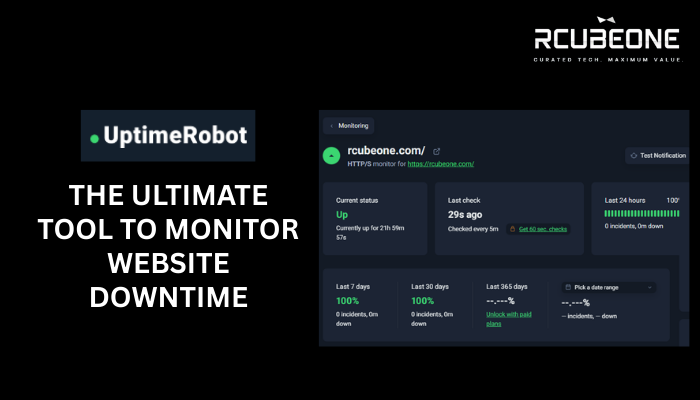
5️⃣ Uptime Percentage Reports
You can see:
- Last 24 hours uptime
- Last 7 days uptime
- Last 30 days uptime
For example:
100% uptime = Excellent hosting
99% uptime = Minor issues
Below 98% = Concerning
This helps evaluate hosting performance.
Free vs Paid Plans
Free Plan
- 50 monitors
- 5-minute checks
- Basic alerts
Perfect for:
- Bloggers
- Small websites
- Beginners
Paid Plans
- 1-minute checks
- Advanced alerts
- SMS credits
- More integrations
- Faster monitoring
Ideal for:
- Businesses
- Agencies
- High-traffic sites
Why Uptime Robot Is Important for SEO
Google prioritizes:
- Reliable websites
- Fast servers
- Stable uptime
Frequent downtime can:
- Reduce crawl frequency
- Affect indexing
- Lower trust signals
Monitoring your uptime ensures your site stays healthy.
How to Set Up Uptime Robot (Step-by-Step)
- Go to UptimeRobot website
- Create a free account
- Click “Add New Monitor”
- Choose monitor type (HTTP recommended)
- Enter your website URL
- Select monitoring interval
- Choose notification method
- Click Save
Done.
Your site is now monitored 24/7.
Who Should Use Uptime Robot?
This tool is perfect for:
- Bloggers
- Affiliate marketers
- Hosting review sites
- eCommerce stores
- Agencies managing client sites
- SaaS founders
- Developers
If your website generates money – you need monitoring.
Real Example Use Case
If you run RCubeOne and publish hosting reviews:
Imagine:
- Your site goes down for 3 hours.
- Googlebot tries crawling.
- It fails.
- Rankings drop.
With Uptime Robot:
You get notified instantly.
You fix it before SEO impact becomes serious.
That’s proactive website management.
Is Uptime Robot Reliable?
Yes.
It has:
- Global monitoring locations
- Stable infrastructure
- Trusted by millions of websites
It’s one of the most popular uptime monitoring tools worldwide.
Final Thoughts
Website downtime is silent damage.
You may not notice it.
Your users will.
Uptime Robot gives you:
✔ Instant alerts
✔ Uptime tracking
✔ Response monitoring
✔ SSL alerts
✔ Peace of mind
Whether you run a blog, business site, or affiliate platform – monitoring uptime is not optional anymore.
It’s essential.